
Most advice on webinars gets the order wrong. It starts with slides, software, or a platform demo, then wonders why the room fills with registrants who never turn up, never engage, and never buy. How to create webinars that work in the UK starts much earlier, with one objective, one audience problem, and one credible reason for anyone to give you their attention.
The audience is there. Ofcom reported that in 2025, 94% of UK households had internet access and 88% of adults were internet users, which is why webinar planning can assume a digital-first journey from registration to replay rather than a patchwork of offline workarounds. The challenge isn't reach, it's relevance, timing, and trust, especially when online video is already a crowded habit in the media mix, as set out in Ofcom's Media Nations 2025 reporting.
Why Most Webinars Fail Before They Start
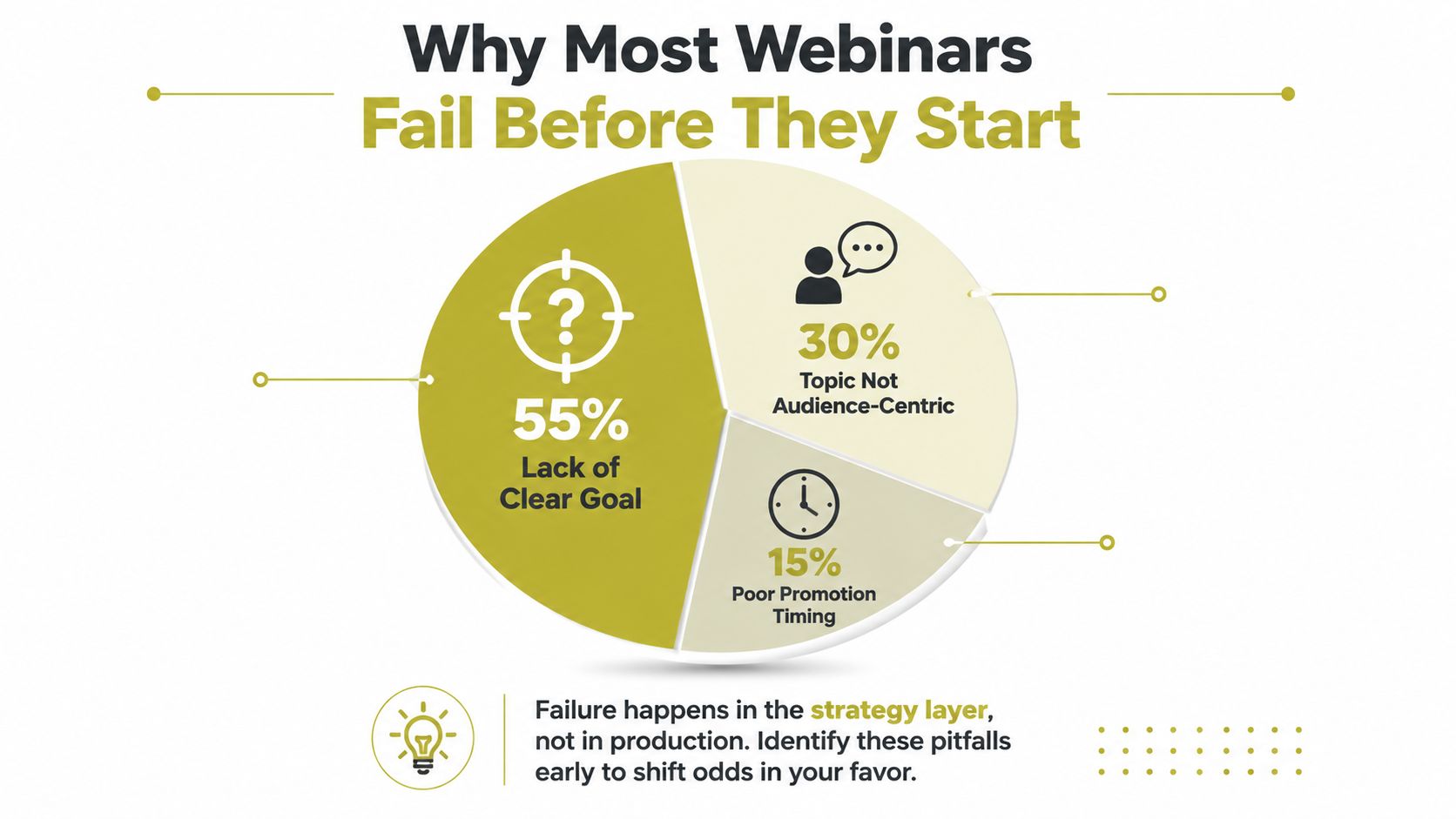
The biggest mistake is treating registration as the finish line. It isn't. The numbers that matter are live attendance, replay consumption, and whether the session moves people towards a decision. If a webinar fills up with names but no one turns up, or the replay gets ignored, the campaign has failed before the content even had a chance to work.
The hidden failure is strategic, not technical
A webinar can have polished graphics and still fall flat if the topic is too broad, the promise is vague, or the speaker sounds interchangeable with every other vendor in the market. That is where many UK SMEs lose the thread. They promote a generic session, collect a long list of names, and then discover that the audience never really had a reason to attend live. A webinar should behave like a content asset with a job to do, not a one-off event judged by the size of the registration list.
Practical rule: if you cannot say what changes for the attendee after 45 minutes with you, the webinar is not ready.
The better mindset is conversion over vanity. A realistic planning approach in the UK accepts that live attendance will often sit well below registrations, then designs for replay value, follow-up, and lead movement after the event. That means the webinar is one touchpoint in a longer funnel, and it should be built to keep working after the live slot ends.
What to measure instead of applause
Strong webinar teams watch a small set of outcomes and ignore the noise. They track whether the topic earned sign-ups from the right people, whether the live session held attention, and whether the replay picked up the rest. They also check whether the event produced a clear next step, because an audience that enjoys the session but never advances is not a commercial win.
The practical shift is simple. Stop asking whether the webinar went well and start asking whether it moved people closer to a decision. That is the standard that turns webinars from a broadcast into a repeatable funnel asset.
Defining Your Objective and Choosing a Topic That Earns Attention
The cleanest webinar decisions are made before anyone opens PowerPoint or Canva. Start with one measurable objective, then choose a topic that serves that objective and solves a real audience problem. If the goal is pipeline, the topic must attract people who could buy. If the goal is authority, the topic has to prove you know something useful that others can't say with the same credibility.
Pressure-test the topic before you build anything
The best topic ideas usually come from questions prospects already ask, objections they raise, or problems they keep repeating in sales calls and support conversations. A webinar that answers a real market question feels timely because it is timely. A webinar that merely repeats industry clichés will struggle, no matter how good the slides look.
For topic selection, use editorial judgement rather than internal enthusiasm. Ask whether the idea is specific enough to be useful, timely enough to feel current, differentiated enough to stand out, credible enough to survive sceptical scrutiny, and aligned with a business outcome that matters. Former national news journalists tend to think this way by instinct, because they know weak angles don't survive first contact with an audience.
Use this filter: if the subject sounds like a website menu item, it's too broad.
A one-sentence webinar promise is the ultimate test. It should tell a prospect what they'll learn, why it matters now, and what they can do next. If that sentence feels fuzzy, the topic needs more work. If it feels sharp, you've got the foundation for the landing page, email copy, speaker brief, and closing CTA.
Validate demand without overbuilding
A common mistake is spending weeks on slides before checking whether the market wants the session. The lighter test is often better. A teaser poll, a customer question review, or a sanity check against the phrasing buyers use can save a lot of wasted production time. The point isn't to chase popularity, it's to avoid building a beautifully packaged topic nobody urgently needs.
This is also where credibility matters. In regulated sectors, or anywhere buyers are cautious, the topic should prove expertise rather than inflate it. That's why a narrow, useful angle usually wins over a broad “state of the industry” session. A practical webinar promise beats an abstract one every time.
Building the Webinar From Landing Page to Run of Show
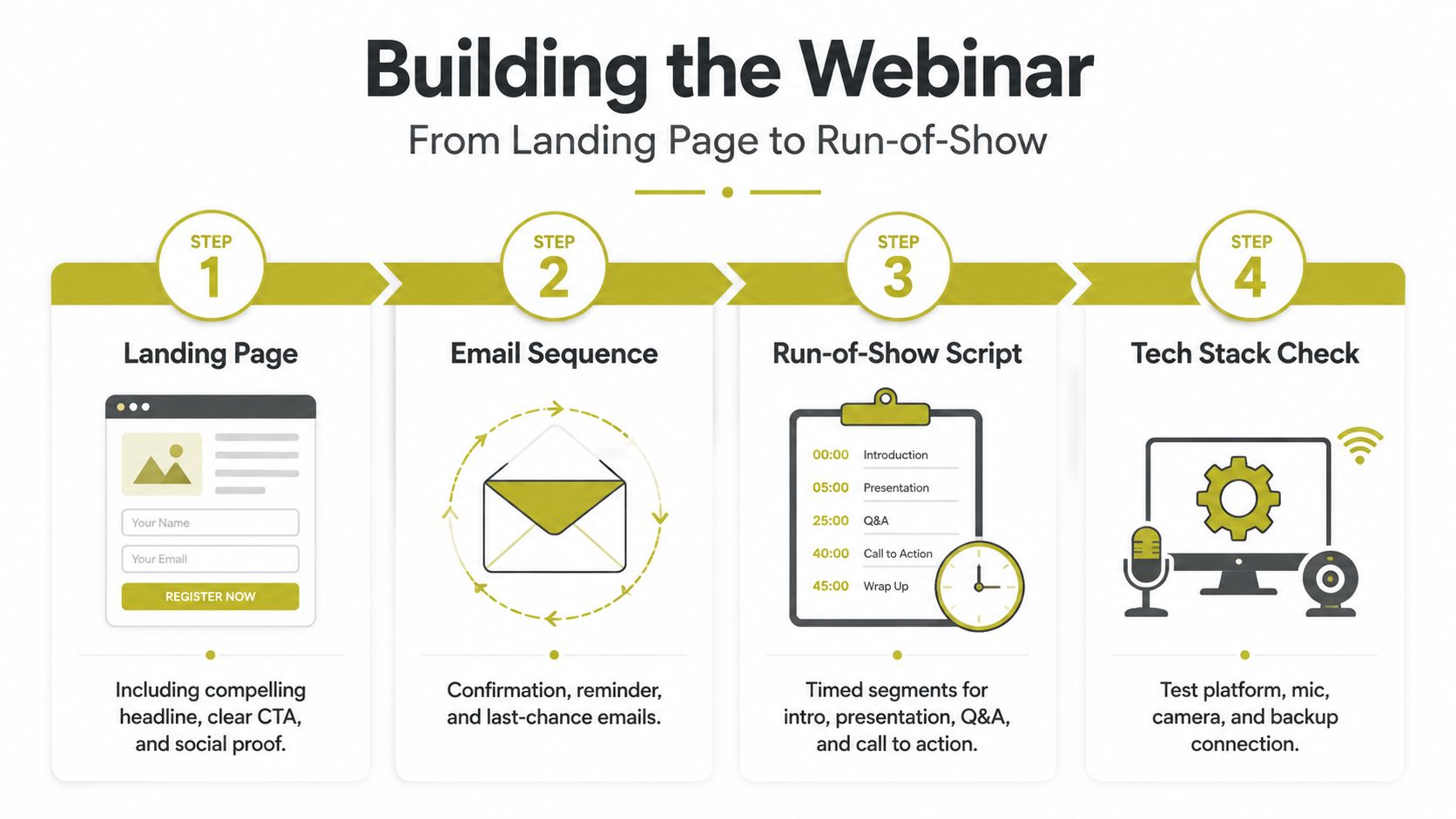
The first operational step is the landing page and sign-up form. That matters because it gives the campaign a conversion point before promotion starts, rather than leaving the team to invent one later. UK corporate communications guidance frames this as the right way to think about webinar build-out, and it's the point many teams miss when they rush into slide design.
Build the conversion path first
A solid landing page does three jobs. It explains the promise, captures the registration, and sets expectations for what happens next. For a useful reference point on page structure and conversion thinking, Carlos Alba Media's landing page best practices is a sensible starting point for the mechanics of a clean sign-up journey.
After the page, build the email sequence. Confirmation, reminder, and last-chance emails are not admin, they're attendance drivers. Then write the content arc separately from the platform setup. That split keeps the webinar anchored in outcome, not aesthetics.
Lock the offer before the slides
One of the most common production mistakes is designing slides before the offer and audience outcome are clear. That creates a webinar that looks polished but wanders. The smarter order is: objective, topic, speaker, landing page, then content architecture. Only after that should you shape the slides around the story.
A practical run-of-show keeps the session tight. Use a hook that earns attention quickly, a clear promise, three to five teaching beats, a soft transition into the offer, Q&A, and one decisive call to action. If the webinar doesn't have a visible narrative arc, the audience will feel it, even if they can't articulate why.
Rehearse the whole thing, not just the slides
A dry run isn't optional. Good teams test the camera, microphone, screen-sharing, speaker handoff, and fallback connection before going live, then rehearse the full flow at least 24 hours in advance. That kind of rehearsal catches the little failures that damage confidence on the day.
If you want a practical lesson in avoiding a clumsy registration journey, the registration page should be treated as a live sales asset, not a static event notice. The same thinking applies to the rest of the build. Every part of the journey should remove friction and support the conversion you want.
Structuring a 60-Minute Session for Maximum Engagement
A webinar that holds attention needs pacing, not just information. The strongest 60-minute format is deliberately broken into sections, so the audience gets momentum, variety, and a reason to stay present. One well-used structure puts 5 to 10 minutes into the introduction, 5 minutes into the problem and hook, 30 to 40 minutes into the main content, 5 to 10 minutes into an interactive segment, 10 to 15 minutes into Q&A, and about 5 minutes into the closing and CTA, as set out in the webinar script guidance.
A practical 60-minute breakdown
| Segment | Duration | Purpose |
|---|---|---|
| Introduction | 5 to 10 minutes | Set context, credibility, and expectations |
| Problem and hook | 5 minutes | Frame the pain point and why it matters now |
| Main content | 30 to 40 minutes | Deliver the core teaching points |
| Interactive segment | 5 to 10 minutes | Polls, chat, or audience participation |
| Q&A | 10 to 15 minutes | Handle objections and clarify key points |
| Closing and CTA | About 5 minutes | Drive the next step |
The pacing rule that matters most is interactivity every 10 to 15 minutes. That stops the session turning into a lecture and gives the audience a reason to lean in. It also creates natural resets for attention, which helps on camera where energy can flatten surprisingly fast.
Use the room like a broadcast, not a classroom
Stagecraft matters because webinar attendees are effectively watching a presenter through a screen, not sitting in a meeting room. Speak a little more deliberately than you would in a corridor conversation, vary your energy around key transitions, and use short pauses after important points. That helps the audience follow the argument and gives the content weight.
Keep answers tight in the live Q&A. If a question starts pulling the session into a side alley, answer the point that matters, then return to the planned narrative. A strong moderator or host keeps the event on rails without sounding rigid.
The goal isn't to say more. It's to make the right points land.
One more practical habit helps. Write the session as a sequence of spoken beats, not as slide notes. That forces clarity, improves timing, and makes it easier to recover if the room goes quiet or a question arrives unexpectedly.
Designing for Accessibility and Credibility
Accessibility and credibility change webinar performance because they shape whether people can use what you've made. This is more than compliance. It's about whether the session works for the widest possible audience and whether the claims inside it survive scrutiny. Generic webinar guidance often skips both, which is a serious blind spot when the webinar is supposed to build trust.
Accessibility is a quality issue, not a side issue
Independent guidance on accessible webinars recommends practical moves such as audio descriptions for slides, strong colour contrast, avoiding colour-only cues, good microphones or headsets, quiet rooms, and pre-event sound checks. Those are simple operational choices, but they make a major difference to how easy the session is to follow, especially for disabled and neurodivergent attendees, as set out in accessible webinar guidance.
The UK context makes that matter commercially. An estimated 16 million people in the UK were disabled in 2023/24, equal to 24% of the population, so ignoring accessibility means ruling out a large audience segment. Poor accessibility also weakens the experience for everyone. Bad audio, cramped slides, weak contrast, and hard-to-follow visuals make the recording less usable as well.
Credibility has to be visible on the slide
If a webinar contains statistics or measurable claims, the presentation itself should show where those claims come from. In-slide citations or a reference list give the audience a way to trust the evidence in real time. Presentation-research guidance also recommends finding at least two independent sources for any statistic that appears on a featured slide, and that standard is worth applying when the audience includes journalists, prospects, investors, or regulated-sector stakeholders, as outlined in the research guidance on presentations.
For a newsroom-grade standard, the webinar should feel sourced, not improvisational. The presenter should know which claims are opinion, which are operational guidance, and which are hard evidence. That clarity helps the audience follow the argument and protects the host from sounding loose with facts.
The user experience guidance for accessible digital content is a useful companion reference if you want the broader logic behind clarity, readability, and user-first delivery.
Build trust signals into the format
A credible webinar doesn't wait until the end to prove itself. The speaker bio should signal why this person is qualified to talk. The slides should be clean enough to support the story. The audio should be good enough that no one is straining to hear. When those basics are in place, the webinar becomes easier to trust, easier to share, and easier to repurpose later.
Promoting the Webinar and Converting Attendees Into Leads
Webinar promotion works best when timing, channel mix, and follow-up are treated as one campaign, not three separate tasks. UK webinar teams usually get better attendance when they avoid random send times and build around midweek scheduling, with the strongest response often landing around late morning to early afternoon. That gives planners a practical starting point, even if it does not guarantee a full room.
Promote across more than one channel
Email should carry most of the weight, but it should not stand alone. Social posts, partner lists, website placements, and direct promotion from the team all widen the route into the registration page. The campaigns that hold up best use several entry points, so one audience gap does not sink the whole effort.
The sequence matters more than a single announcement. A clear invitation, one or two reminder emails, and a final nudge usually beat one broadcast send. If the email side needs sharper structure, Carlos Alba Media's email marketing service sits in the same practical space as the registration and reminder flow you need for a webinar campaign.
The follow-up is where the value compounds
The commercial value starts after the live session. Contact attendees quickly, make the recording available, and give absent registrants a clean replay route. That approach matches the host-and-follow-up workflow guidance and keeps lead generation alive after the live event has ended, as noted in the host-and-follow-up workflow guidance.
If the replay needs trimming before reuse, a practical guide to edit your meeting recordings helps turn rough footage into something worth sending again. A webinar recording should feel prepared for an audience, not left in its raw state.
Measure what the webinar actually did
Track attendance rate, engagement, replay views, and conversion. Those are the figures that show whether the webinar worked as a business asset, not just as a live broadcast. If the session is meant to support demand over time, pair the measurement with a simple reporting habit so you can see which topics, invitation angles, and reminder timings pull their weight, as summarised in the webinar analytics benchmark roundup.
Then reuse the material in smaller pieces, such as a blog post, key takeaways, or short clips. That keeps the webinar working after the live date and gives the content a longer commercial life.
The best webinars feel current in the moment and useful for weeks afterward. That is the difference between a one-off stream and a repeatable funnel asset that keeps producing leads.