

Your site looks respectable. It loads, the branding is tidy, and people are finding it. Yet the enquiries are thin, the sales don’t match the traffic, and too many visitors vanish without doing anything useful.
That’s usually not a traffic problem. It’s a user experience problem.
Most advice on how to improve website user experience gets stuck at surface level. It tells you to “make it intuitive” or “improve navigation” and leaves you with a list of vague design clichés. That’s not good enough if you run an SME with a real budget, real pressure, and no appetite for a six-month redesign that may or may not pay back. At Carlos Alba Media, the standard is different. The team combines former national news journalists with senior agency operators who’ve worked with international brands, so the lens is always the same: make the message clear, remove friction, and tie every change to a commercial outcome.
Why Your Website Isn't Converting and How to Fix It
Most SME websites don’t fail because they look old. They fail because they make people work too hard.
A visitor arrives with a question. They want pricing, proof, reassurance, or a quick route to contact. If your homepage buries the offer, your menu uses internal jargon, or your form asks for too much too soon, that visitor leaves. The design may still win compliments. The business still loses.
That’s why how to improve website user experience should start with commercial reality, not aesthetics. Research highlighted by Orbit Media notes that 76% of users prioritise finding information as the most important design factor in findings cited from HubSpot, yet many UX guides stop short of showing SMEs how to connect that to KPIs such as form completions or customer acquisition cost in practice, which is exactly the gap this ROI-focused approach addresses (Orbit Media’s UX improvement analysis).
Your website isn’t a brochure. It’s a decision environment. Every unnecessary click, vague headline, and slow page asks the user for more effort than they’re willing to give.
The fix is rarely a dramatic rebuild. It’s usually a disciplined sequence of improvements. Tighten navigation. Clarify the offer. Speed up key pages. Strip friction from forms. Test the call to action. Then measure whether those changes produce more leads, more bookings, or more sales.
If you run ecommerce, that same principle applies to product pages, basket flows, and post-click confidence signals. For a practical companion piece focused on retail journeys, this guide on how to enhance shopper experience is worth reading alongside your UX work.
Stop asking whether your site “looks professional”. Ask whether it helps a busy buyer complete a task without hesitation.
Conducting a DIY User Experience Audit
A proper audit doesn’t start with design opinions. It starts with evidence.
You don’t need a lab, a research team, or an expensive consultancy to spot the obvious friction. You need a short list of tools, a clear method, and enough honesty to admit where the site is making life difficult for users.

Start with the pages that matter
Don’t audit every page equally. Start where commercial intent is highest. For most SMEs, that means:
- Homepage review: Check whether the offer is obvious in seconds, not after a scroll.
- Service or product pages: Look for missing pricing context, weak proof, and vague calls to action.
- Contact or enquiry forms: Count every field and ask whether it’s necessary.
- Checkout or booking pages: Watch for friction, uncertainty, and distractions.
Use Google Analytics 4 to identify landing pages with strong traffic but weak engagement or poor conversion contribution. Then use Google PageSpeed Insights to see whether performance is undermining the experience before content even gets a chance.
If you need a parallel technical and search review, Carlos Alba Media has a practical SEO audit checklist that pairs well with a UX audit because user friction and search underperformance often show up on the same pages.
Watch what users actually do
More often than not, assumptions fall apart.
Install Hotjar or a similar session recording and heatmap tool. Review recordings from mobile and desktop separately. You’re looking for hesitation, rapid scrolling, repeated clicks, backtracking, and abandonment at moments where the path should be obvious.
A few patterns tend to show up quickly:
- Users ignore key buttons: Usually because the copy is weak or the placement is poor.
- Visitors rage-click menus or filters: Usually a sign the interface isn’t behaving as expected.
- People skim but don’t act: Often a messaging problem, not a traffic problem.
- Mobile users stall on forms: Common when fields are fiddly, labels are unclear, or the keyboard experience is awkward.
Practical rule: If users need to stop and think about where to click next, the interface has already underperformed.
This is also a good point to revisit the basics. If you need a clean primer on key UX design principles, use it as a reference while reviewing your own pages. Principles matter most when you can see where your current site breaks them.
Run a blunt heuristic review
A heuristic review sounds formal. In practice, it means walking through your own site with discipline instead of familiarity.
Open your website in a private browser. Use your phone, not just your laptop. Then ask hard questions.
Homepage checks
- Clarity of offer: Can a first-time visitor tell what you do and who it’s for?
- Proof of credibility: Are testimonials, client names, or examples easy to spot?
- Direction of travel: Is there one obvious next step?
Navigation checks
- Menu labels: Do they use customer language rather than internal terminology?
- Hierarchy: Are important pages easy to find without digging?
- Dead ends: Does any page leave the user unsure what to do next?
Conversion checks
- CTA quality: Does the button describe the value of clicking?
- Form friction: Are you asking only for what you need now?
- Trust signals: Do buyers see enough reassurance before committing?
A good audit produces a prioritised list, not a thick report. Rank issues by two criteria: how much commercial damage they’re likely causing, and how quickly they can be fixed.
Turn findings into a working list
Don’t write “improve homepage”. That’s useless. Write specific actions.
For example:
| Area | Problem spotted | Action |
|---|---|---|
| Homepage hero | Headline is generic | Rewrite to state audience, offer, and outcome |
| Mobile menu | Service labels are vague | Rename items using customer search language |
| Contact form | Too many required fields | Remove non-essential questions |
| Service page | No proof near CTA | Add testimonial or relevant client example |
That’s how you improve website user experience in practice. Not with abstract design theory, but with a short, evidence-led list of issues that users are already showing you.
Securing High-Impact Quick Wins
If you’re running a small team, speed matters. You need changes that improve the user experience without waiting for a full rebuild, a new CMS, or a drawn-out design process.
The best quick wins sit in three places: site speed, mobile usability, and accessibility.

Fix speed before you polish visuals
Users don’t wait around while your oversized images, bloated scripts, and third-party widgets sort themselves out.
For UK SMEs, speed isn’t a technical vanity metric. It has direct commercial consequences. Amplitude’s analysis notes that 53% of mobile users abandon sites loading over 3 seconds, and that incremental A/B tests can deliver a 25% uplift while site overhauls fail 70% of the time. The same analysis also states that systematically removing friction can produce conversion boosts of up to 300% (Amplitude’s website UX analysis).
Start with the obvious fixes:
- Compress large images: Export web images at sensible dimensions before uploading.
- Remove unnecessary plugins: If it doesn’t support conversion, question why it’s there.
- Delay non-essential scripts: Chat widgets, trackers, and animation libraries often slow key pages.
- Audit your homepage first: It’s usually carrying the most weight and the most distractions.
If your team needs external support, Carlos Alba Media is one option among others for web design and development work that focuses on performance and conversion, rather than design for its own sake.
Make the mobile journey thumb-friendly
A responsive site isn’t automatically a usable mobile site. Many pages technically resize but remain awkward to use.
Watch your own site on a phone and notice where your thumb naturally sits. If key buttons are hard to reach, forms are cramped, or text blocks are too dense, your mobile UX needs work.
Focus on these improvements:
- Move critical actions higher: Don’t bury the primary CTA after long stretches of copy.
- Increase tap targets: Buttons and links need breathing room.
- Shorten forms: Mobile users have less patience for admin.
- Break long paragraphs: Dense copy becomes harder to scan on small screens.
A clear mobile path often outperforms a visually clever one.
Better UX usually looks simpler than the version it replaces.
Here’s a useful explainer on mobile-friendly experience and practical UX improvements:
Treat accessibility as commercial protection
Accessibility is too often treated as a side issue. It isn’t.
In the UK, organisations can face potential discrimination claims under the Equality Act 2010 if their websites are inaccessible. That makes accessibility a risk management issue as well as a user experience issue, and it also broadens the market you can serve (Smartling’s guide to improving website UX).
That means your quick wins should include:
- Clear contrast: Text must be easy to read against the background.
- Useful alt text: Describe meaningful images properly.
- Keyboard access: Make sure users can move through key functions without a mouse.
- Plain labels: Buttons, forms, and navigation should say exactly what they do.
Accessibility also improves clarity for everyone else. Cleaner labels, stronger contrast, and simpler interaction patterns don’t just help users with disabilities. They help rushed buyers, tired visitors, and anyone using your site in a less-than-ideal context.
Improving Your Content and Information Architecture
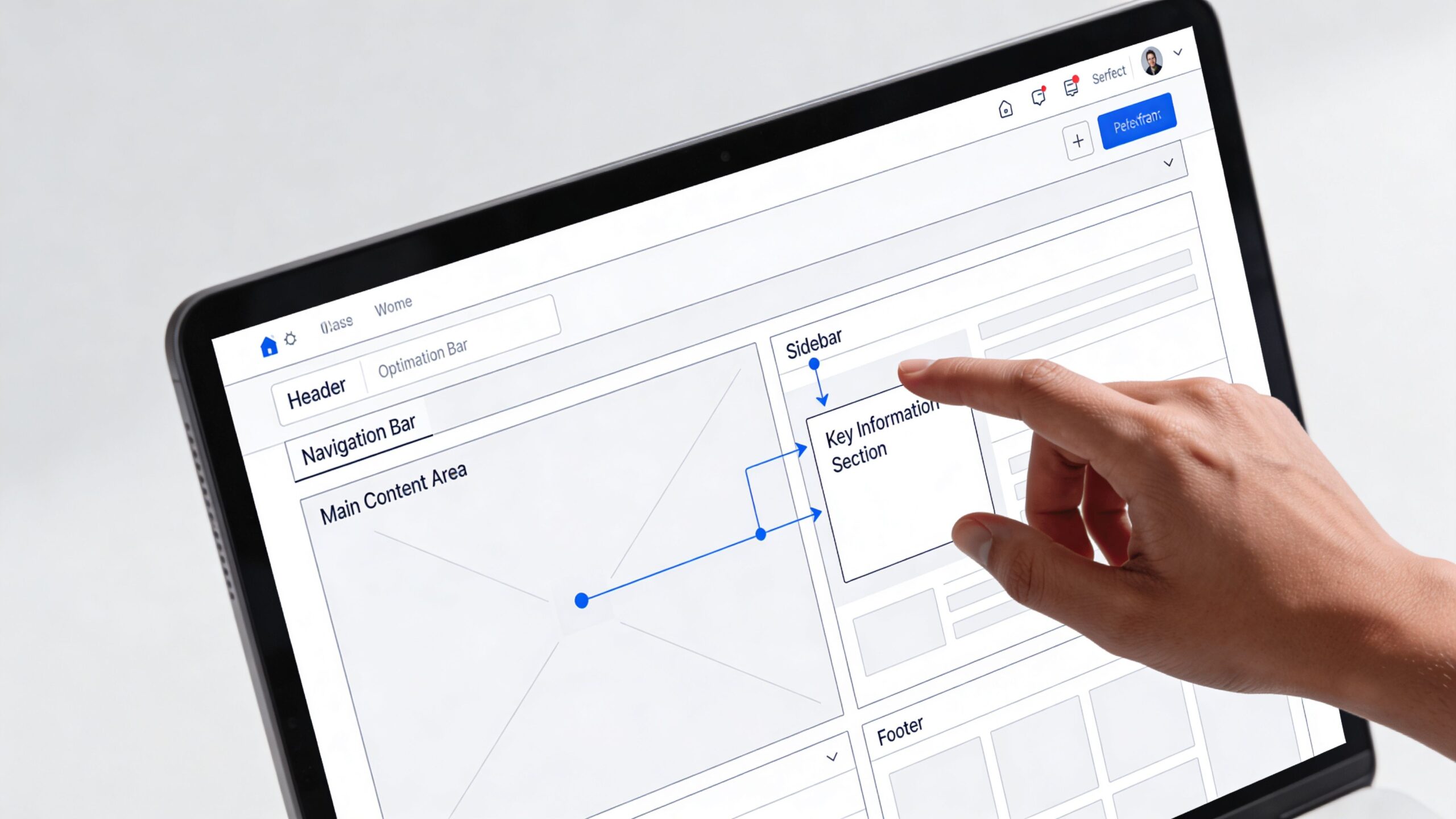
A fast site still fails if people can’t find what they need. That’s where information architecture, or IA, becomes decisive.
Think of IA as the logic behind your site. It’s the structure that decides what goes in the menu, how pages relate to one another, and whether a visitor can move from question to answer without getting lost. When SMEs struggle with conversions, poor IA is often hiding in plain sight. The menu makes sense internally. The user still can’t find pricing, process, sectors, proof, or the contact route that fits their need.
Fix the structure before rewriting everything
Start with your navigation. Print it out if you have to. Then look at it like a first-time visitor.
Most weak structures suffer from one of four problems:
- Internal language: Menu labels reflect how the company talks, not how buyers search.
- Mixed logic: Some items are audience-based, others are service-based, others are random.
- Too much choice: Visitors are forced to interpret rather than move.
- Missing paths: Users know what they want, but there’s no obvious route to it.
A simple exercise works well here. Write your page names on sticky notes and ask a few people outside the business to group them in a way that feels natural. Their logic is often more useful than your own because they don’t carry your internal assumptions.
If users can’t predict where information lives, they stop trusting the structure.
Your IA should help users answer basic questions quickly. What is this? Is it for me? Can I trust it? What do I do next?
Tighten the copy with a journalist’s discipline
Former journalists learn to front-load meaning. Good web copy should do the same.
The homepage headline shouldn’t sound clever if it slows comprehension. Service pages shouldn’t open with company philosophy when the user needs specifics. A contact page shouldn’t make the next step feel uncertain.
Review each core page and ask:
- Single purpose: Does this page have one clear job?
- Headline clarity: Does the first line say something concrete?
- Scan value: Can a user understand the page by reading subheads, bullets, and CTA text?
- Next step: Is the action obvious and relevant?
A lot of copy fails because it tries to say everything. Strong UX copy edits harder. It removes throat-clearing, strips jargon, and replaces soft claims with direct language.
For teams refining both structure and editorial planning, this guide to building a content marketing strategy is useful because IA and content planning should support each other, not compete.
Spot the dead ends that kill momentum
A dead end is any page that answers part of the question but doesn’t move the user forward.
Typical examples include a blog post with no relevant CTA, a service page that explains features without a proof point, or an about page with no route into enquiry. These pages aren’t broken technically. They’re broken strategically.
Use this review method:
| Page type | Common content problem | Better approach |
|---|---|---|
| Homepage | Vague opening message | State audience, offer, and value fast |
| Service page | Too much description, not enough proof | Add evidence and a specific CTA |
| Blog article | Informative but disconnected | Link to related service or next step |
| Contact page | Generic form with no reassurance | Add response expectations and context |
The aim isn’t to add more content. It’s to make existing content easier to understand and easier to act on. That’s the difference between a site that gets read and one that gets results.
Optimising Your Website for Conversions
A website that “engages” but doesn’t convert is underperforming. Harsh, but true.
For SMEs, the smartest path isn’t a large redesign. It’s a steady programme of small tests that improve the moments where commercial intent is highest. Change one thing, measure the effect, keep what works, and move on. That’s less glamorous than a relaunch. It’s also far more sensible.
Small tests beat expensive reinvention
Big redesigns create risk. They introduce too many variables at once, muddle attribution, and often replace known problems with unknown ones.
Incremental testing is different. You isolate a friction point and test a sharper alternative. That might be button text, form length, CTA placement, layout order, or the amount of proof near a decision point. This is how to improve website user experience without gambling the quarter on a redesign trend.
A useful test hypothesis looks like this:
- Current issue: Users land on the service page but don’t enquire.
- Suspected cause: The CTA is vague and appears too late.
- Test change: Replace “Submit” with a value-led action and move the button higher.
- Measure: Compare enquiry completions and user behaviour on the page.
Focus on high-friction elements first
Not everything deserves a test. Start with elements closest to the conversion.
Prioritise:
- Calls to action: Weak CTA copy often hides the value of clicking.
- Forms: Every extra field gives the user another reason to stop.
- Page speed on money pages: If the pricing or booking page drags, intent decays quickly.
- Trust signals: Testimonials, client logos, guarantees, and process clarity reduce hesitation.
If you want a practical companion on conversion mechanics, Carlos Alba Media has a useful guide on how to increase website conversion rates.
Test the point of hesitation, not the decoration around it.
The commercial case is straightforward. As noted earlier from Amplitude’s analysis, site overhauls fail 70% of the time, while incremental A/B tests on elements like calls to action can deliver a 25% uplift. The same source ties performance to outcomes by noting that 53% of mobile users abandon sites loading over 3 seconds, and that friction removal can drive conversion boosts of up to 300% in the right conditions. Those numbers matter because they support a simple operating principle: remove friction in small, measurable steps.
Write CTAs and forms like you mean business
“Submit” is lazy copy. So is “Learn more” when the user is already at decision stage.
Good CTA language answers the user’s silent question: what happens if I click this? “Get a quote”, “Book a consultation”, and “See pricing” are stronger because they reduce ambiguity. They tell the user what they’re getting, not just what they’re doing.
Apply the same logic to forms:
- Ask for less upfront: Capture only what’s needed for the next step.
- Label clearly: Don’t make users interpret field requests.
- Explain what happens next: Response times and expectations reduce uncertainty.
Conversion optimisation isn’t manipulation. It’s clarity applied to action.
Measuring Success and Prioritising for Small Teams
You can’t improve UX by instinct alone. You need a simple operating system for deciding what matters, what’s working, and what can wait.
For small teams, that system should be light enough to run consistently. If measurement becomes a separate job in its own right, it won’t happen. The answer is a lean loop: test with real users, track a small set of meaningful metrics, then prioritise changes by impact and effort.
Use five-user testing to uncover the obvious problems
Many SMEs skip user testing because they assume it’s expensive or slow. That’s usually an excuse.
The Nielsen Norman Group found that testing with just 5 users is enough to uncover 85% of a website’s usability problems (Nielsen Norman Group on success rate and usability testing). That makes user testing one of the most efficient ways to validate changes before you spend heavily on design or development.
Recruit people who resemble your actual audience. For a Scottish tech SME, that might mean decision-makers, buyers, or operational users within your target market. Give them realistic tasks such as finding pricing, booking a consultation, or locating a case study. Then watch where they hesitate.
A five-user test works best when the tasks are concrete:
- Find a service and explain what it includes
- Locate pricing or the nearest equivalent
- Submit an enquiry
- Identify why the business is credible
- Complete the next step on mobile
Don’t lead them. Don’t explain the interface. Let the site prove whether it’s clear enough.
The point of testing isn’t to hear compliments. It’s to catch confusion before it costs you leads.
Track KPIs that reflect business intent
Traffic on its own doesn’t tell you much. A site can attract visitors and still fail commercially.
For SMEs, the better approach is to track a short list of behaviour and outcome metrics in Google Analytics 4 and your CRM or lead management system. Focus on measures that link to intent and action, such as:
- Form completions: The clearest sign your message and journey are doing their job.
- Calls or booked meetings: Useful where conversions happen partly offline.
- Landing page engagement: Stronger than raw visits when judging message relevance.
- Drop-off points: Essential for spotting where users abandon key journeys.
- Page-level conversion contribution: Which pages assist or complete the outcome you care about.
If a page gets attention but contributes little to enquiries, ask why. Is the CTA weak? Is the proof thin? Does the page answer the wrong question? The metric should trigger investigation, not sit passively in a dashboard.
Prioritise with an impact versus effort filter
Once you’ve audited the site, reviewed recordings, and gathered user feedback, you’ll usually have more possible fixes than capacity. That’s where teams drift into indecision.
Use a simple prioritisation matrix. Every task goes into one of four buckets.
| Category | Description | Example Tasks |
|---|---|---|
| High impact, low effort | Fix these first | Rewrite homepage headline, shorten form, improve CTA copy |
| High impact, high effort | Plan these carefully | Rework navigation structure, redesign pricing page flow |
| Low impact, low effort | Do when time allows | Tidy spacing, refine secondary buttons, update small UI labels |
| Low impact, high effort | Usually defer | Rebuild low-value pages, add features users haven’t asked for |
This approach prevents a common SME mistake. Teams often spend weeks polishing low-impact details because they’re easier to agree on than bigger structural issues. Button shadows get discussed. Broken user journeys survive untouched.
Build a repeatable monthly rhythm
You don’t need a grand UX programme. You need consistency.
A workable rhythm for a small business looks like this:
Review one high-value journey each month
Pick a core path such as homepage to enquiry, product page to basket, or service page to contact.Pull evidence from analytics and recordings
Check where users are dropping off and where they appear to hesitate.Run one small test or fix
Keep scope tight enough to measure.Validate with a handful of users
Even informal task testing will expose avoidable confusion.Log the result and reprioritise
Build an internal record of what changed and what happened next.
That discipline matters more than sophistication. Teams that improve steadily usually outperform teams that wait for the perfect redesign brief.
Don’t confuse activity with progress
There’s a lot of busywork in UX. New heatmaps, fresh mock-ups, navigation workshops, dashboard tweaks. Some of it helps. Some of it just creates motion.
Progress means users complete valuable actions more easily than they did before. That’s the standard. If a change doesn’t make the journey clearer, faster, or more trustworthy, it’s probably not worth doing yet.
Small teams win when they stay ruthless about that distinction.
A Journalist's Take on Building a Better Website
The best websites behave like good reporting. They get to the point quickly, answer the reader’s obvious questions, and make the next step clear.
That’s why improving UX isn’t really about chasing trends. It’s about removing confusion. You audit the evidence, fix the obvious friction, sharpen the message, and test the points where users hesitate. Then you do it again. Not because your site is broken, but because user expectations change and commercial pressure doesn’t let you stand still.
For SMEs, that’s good news. You don’t need a massive budget to improve website user experience. You need discipline, clarity, and a willingness to act on what users are already showing you. Fast pages, better structure, cleaner copy, simpler forms, and measured testing will usually beat a flashy relaunch every time.
That newsroom mindset still holds up in digital. Lead with the important point. Cut what doesn’t earn its place. Respect the reader’s time. If your website does that, it won’t just feel better to use. It will work harder for the business.
If your website is attracting attention but not turning enough of it into enquiries, sales, or booked conversations, Carlos Alba Media can help you tighten the message, improve the user journey, and focus your digital effort on measurable commercial outcomes.